


inCarDoc Pro | OBD2
4.3315.00 Reviews
App Specs
- Version
- 7.8.9
- Updated On
- License
- $4.99
- Downloads
- 100,000+
- Developer
- PNN SOFT
- Categories
- Auto & Vehicles
- Platform
- Android, iOS
Screenshots
 Analysis by AppCompare
I like the idea of checking a warning light before deciding what to do next, and that is the clearest reason to consider inCarDoc Pro | OBD2. It turns a compatible phone-and-adapter setup into a way to inspect vehicle diagnostics, rather than a substitute for a mechanic. The distinction matters: readings can help me ask better questions and spot when something needs attention, but they do not make every fault obvious or safe to ignore.
What an OBD2 app can—and cannot—tell you
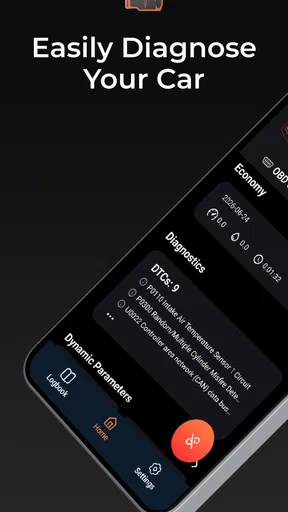
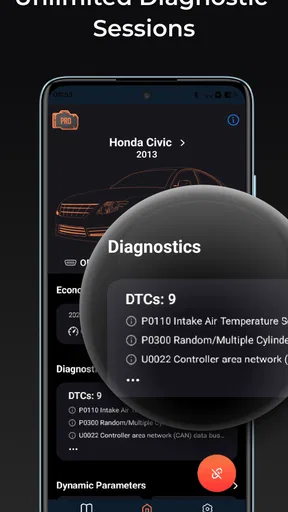
An OBD2 scanner is most useful as a first look. It can surface diagnostic trouble codes and vehicle data that would otherwise require a separate reader, giving me context before a repair visit or helping me follow a problem I am already investigating. A code is a clue, not a complete diagnosis: the same warning can have different causes, and interpretation depends on the car and the circumstances.
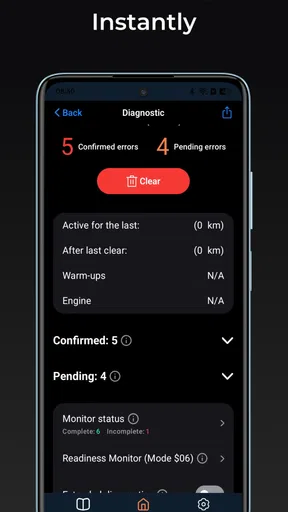
That makes the sensible workflow more important than the act of clearing a light. I would record the code and the conditions around it first, then investigate or get professional advice. Clearing a warning without fixing its cause can hide a symptom temporarily and leave the underlying issue untouched. For a safety-critical warning, a severe drivability change, or a problem I cannot confidently assess, I would stop treating the phone as the answer and get qualified help.
Why the adapter matters as much as the app
Getting started depends on a compatible OBD2 adapter and a connection method the phone and adapter can both use. Bluetooth or Wi-Fi pairing may be straightforward, but it is still a separate piece of equipment, so I would check that the adapter suits my vehicle and phone before paying for the app. The app itself cannot compensate for an unreliable connection or an adapter that does not communicate properly.
Compatibility deserves a little care, too. OBD2 is a common standard, but support for diagnostic functions can vary by vehicle, and the information available is not necessarily identical across makes and models. If I were buying this for a specific car, I would first confirm that the car has a compatible OBD2 port and that the readings I want are available for it. That small check can prevent a frustrating setup and an unnecessary purchase.
A useful routine for real-world checks
For a check-engine warning that appears during an ordinary commute, I would pull over somewhere safe before handling the phone, connect the adapter while parked, and read the code when the car is stationary. I would save the result and note whether the light is steady or flashing and whether the car feels different. That record gives a mechanic more to work with than a vague “the light came on,” while helping me avoid guessing at a repair from a code alone.
For ongoing monitoring, a short, deliberate drive can be more useful than staring at a dashboard full of numbers. I would select only a few readings that relate to the question at hand, keep my attention on the road, and review any graphs or logs once parked. Live data is tempting to watch, but the phone should not become a distraction; a passenger can handle it, or the check can wait until the trip is over.
Worth Reading Before You Choose

Flipboard Shows What News Apps Must Do Beyond the Feed

Switching to Android Auto Means Rethinking Your Driving Routine

Google Calendar Makes a Crowded Week Easier to Manage

Ludo King Makes the Most of the Minutes Between Plans

Baby Panda World Brings Quick Play to Modern Phones, but Its Game Library Feels Busy

ESPN’s Live Game View Makes Following Close Games Easier
Trip and fuel records can also be useful when I want to compare patterns rather than judge one isolated reading. A consistent route and similar driving conditions make a more meaningful comparison than two unrelated trips. Changes in weather, traffic, load, or driving style can affect results, so I would treat any apparent shift as a reason to look closer—not proof by itself that a part has failed.
Getting Started with inCarDoc Pro
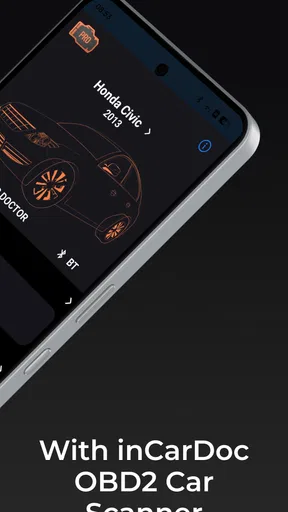
The first thing I noticed about inCarDoc Pro is its user-friendly interface. Once you download the app, connecting it to your car's OBD2 (On-Board Diagnostics) port is straightforward. Just pair it with a compatible OBD2 adapter via Bluetooth or Wi-Fi, and you’re set. If you’re worried about compatibility, the app supports a wide range of car models, so chances are, you’re covered.
Features That Stand Out
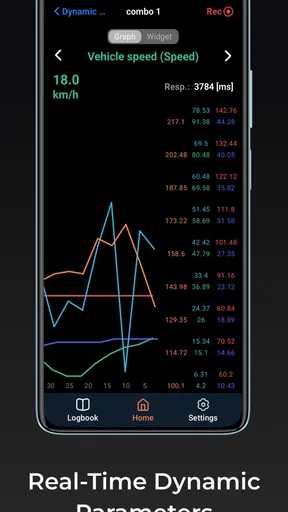
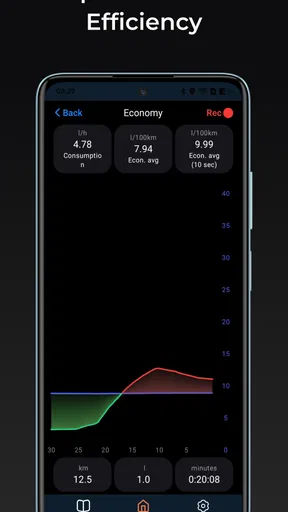
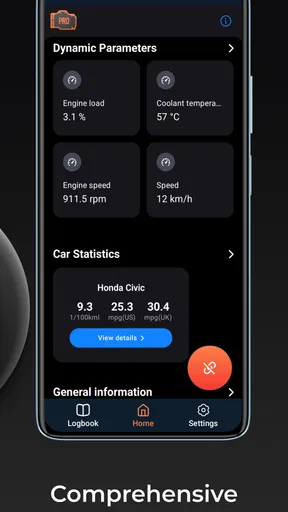
One of the main attractions of inCarDoc Pro is its detailed real-time information. You get access to live data readings from your car's engine, including RPM, fuel consumption, speed, and more. It’s like having a little window into the soul of your car, and it's fascinating to see how it all works.
What really impressed me is the app's ability to read and clear trouble codes. Ever had that annoying check engine light pop up? With inCarDoc Pro, you can quickly identify the issue and even reset the warning light after fixing the problem. It’s a massive money-saver and gives you peace of mind on the road.
Digging Into the Details
The app goes beyond just basic diagnostics. It offers GPS tracking, which is a neat feature if you want to keep tabs on your trips and fuel consumption. You can view detailed graphs and logs for different parameters, giving you a historical view of your car’s performance.
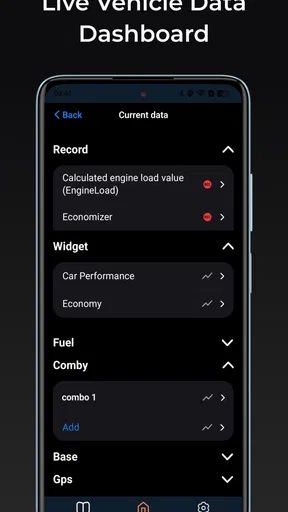
For those who love customization, inCarDoc Pro lets you set up custom dashboard screens. You can choose which parameters to display and arrange them to suit your preferences. It’s all about making the app work for you, and that flexibility is much appreciated.
Ease of Use and Support
In terms of usability, the app scores high marks. It’s intuitive and doesn’t require you to be a car expert to understand the data. The interface is clean, and navigation is a breeze, even for first-time users.
Plus, if you ever run into issues, the support team is responsive. There’s also a comprehensive FAQ section and user forums that can help troubleshoot common problems. It’s reassuring to know you’re not alone if you hit a snag.
Choosing the right kind of scanner
Compared with a basic handheld code reader, a phone-based setup can be more convenient for someone who wants to see live readings, save logs, and tailor a dashboard rather than only retrieve a code. A handheld reader may still be the better choice if I want a self-contained tool that does not depend on pairing a phone, setting up an app, or keeping an adapter handy. A repair shop’s diagnostic equipment is a different level again; for complex faults or manufacturer-specific systems, an app should not be assumed to replace professional testing.
The paid Pro edition is listed at $4.99, while the adapter is a separate practical consideration. I would weigh the app’s value against how often I expect to use it: regular DIY checks and trip monitoring make the purchase easier to justify than a one-time curiosity. It is from PNN SOFT, has an Everyone age rating, and has been available since March 5, 2013; its current version is 7.8.9, with Android 6.0 as the minimum OS. Those details help set expectations for someone checking device compatibility before installing.
Who will get the most from it
If you’re someone who likes to keep a close eye on your vehicle’s health, inCarDoc Pro is a valuable tool. It’s especially useful for DIY enthusiasts who want to take a hands-on approach to car maintenance. The app provides insights that empower you to make informed decisions about your vehicle’s upkeep.
It also suits a practical owner who does not want to become a mechanic but would rather arrive at a repair appointment with a code, a saved observation, and a clearer account of what happened. An occasional user can benefit too, particularly when a warning appears unexpectedly and a compatible adapter is already available. The app has an average rating of 4.3 from around 11,000 ratings, with over 100,000 installs, so it has found an audience among drivers looking for this kind of phone-based tool.
On the other hand, I would skip it if I expect a code to name the exact broken part, if I do not want to buy or configure an adapter, or if I need a comprehensive professional diagnosis. It is also a poor fit for anyone tempted to operate a phone while driving. Reading data while parked and getting expert help when the problem calls for it are part of using a scanner responsibly, not optional extras.
Small habits that make the readings more useful
Before clearing a code, I would save its details and any relevant logs. A warning that disappears after a reset has not necessarily been repaired, and losing the original clue can make a later conversation with a technician less precise. If the same code returns, the saved history helps show that it is recurring rather than a one-off event.
I would also avoid treating every dashboard number as equally meaningful. Custom screens are most helpful when they show a small set of readings tied to a specific question; too many simultaneous values make it harder to notice what matters. Graphs are best used to compare a pattern over time, while a single reading is only a snapshot. That is a modest but important trade-off: customization can make the app clearer, but it asks the user to choose what to monitor.
For fuel-use observations, I would compare similar trips and use the same approach each time. A change may reflect traffic or driving conditions rather than a mechanical issue, so logs are more useful as supporting evidence than as a verdict. This kind of careful use is where the app’s history and graphs can add value beyond a one-time scan.
Even if you’re not a car buff, the app’s ability to decode error messages can save you from unnecessary trips to the mechanic. It’s like having a personal diagnostic tool right in your pocket.
In conclusion, inCarDoc Pro | OBD2 is a worthwhile option for drivers who want a more informed first look at their car and are comfortable pairing a phone with a compatible adapter. Its live readings, code access, trip records, and customizable displays give curious owners more to work with than a simple warning light or basic reader. I would recommend it to hands-on drivers who will save information and use it thoughtfully, not to anyone expecting a phone app to deliver a definitive diagnosis. If that distinction suits you, it is a sensible tool to keep available; if you need certainty about a serious fault, a qualified mechanic remains the better next step.
Pros
- Comprehensive diagnostics for all car models.
- Real-time data monitoring and logging.
- User-friendly interface with clear visuals.
- Supports a wide range of OBD2 protocols.
- Extensive database of DTC codes.
Cons
- Requires a compatible OBD2 adapter.
- Some features need in-app purchases.
- Occasional connectivity issues.
- Interface may feel cluttered for beginners.
- Limited customer support options.
FAQs for inCarDoc Pro | OBD2
What is inCarDoc Pro and how does it work?
inCarDoc Pro is a comprehensive vehicle diagnostic app that connects with your car's OBD2 system to provide real-time data and diagnostics. Using a compatible OBD2 Bluetooth or Wi-Fi adapter, it reads various parameters such as engine performance, fuel efficiency, and error codes, helping you monitor and maintain your vehicle's health efficiently.
Is my vehicle compatible with inCarDoc Pro?
inCarDoc Pro is compatible with most vehicles manufactured after 1996 that comply with the OBD2 standard. Before purchasing an OBD2 adapter, check if your vehicle has the standard OBD2 port, typically located under the dashboard. It's advisable to consult your vehicle's manual or a professional to confirm compatibility.
What features are included in inCarDoc Pro?
inCarDoc Pro offers a wide range of features, including real-time monitoring of vehicle parameters, diagnostic trouble code reading and clearing, fuel consumption tracking, and trip logging. The app also provides customizable dashboard displays and the ability to export data, making it a versatile tool for both casual drivers and car enthusiasts.
What kind of OBD2 adapter do I need for inCarDoc Pro?
To use inCarDoc Pro, you'll need a compatible OBD2 Bluetooth or Wi-Fi adapter. These adapters can be purchased separately and should be designed to work with your smartphone's connectivity options. When choosing an adapter, ensure it is compatible with both your vehicle and the app to avoid connectivity issues.
Are there any costs associated with using inCarDoc Pro?
While inCarDoc Pro is a paid app, offering an extensive range of features, additional costs may include purchasing the OBD2 adapter. Some features may require in-app purchases or subscriptions for advanced functionalities. It's important to review the app's pricing details before downloading to ensure it fits your budget.


